Work From Home Posture: How to Set Up Your Desk to Prevent Pain in Ottawa
Working from home has changed how many people sit, move, and work throughout the day. For some, that means a proper desk setup—but for many others, it’s the couch, kitchen table, or wherever space allows.
Over time, these setups can lead to increased tension, stiffness, and discomfort—especially through the neck, shoulders, and upper back. The good news is that small, realistic changes can make a noticeable difference.
Why Your Work From Home Setup Matters
Your body isn’t designed to stay in one position for hours at a time. When your workstation doesn’t support you well, your muscles and joints begin to compensate. That’s when you start to notice that familiar tightness creeping in.
For many people, this shows up as neck stiffness, upper back tension, or even headaches that build throughout the day. These patterns often overlap with what we see in neck pain and upper and mid-back discomfort, especially when posture habits become repetitive.
The Biggest Issue: The Couch + Laptop Combo
Let’s talk about the one that comes up the most.
Working with your laptop on your lap—especially on the couch—naturally pulls your body into a slouched position. Your head moves forward, your shoulders round, and your lower back loses support. It might feel comfortable at first, but your body usually tells a different story after a few hours (or a few weeks).
Even if it’s not realistic to avoid the couch entirely, it helps to recognize how much strain it can create and limit how often you rely on it.
What a Supportive Setup Looks Like
You don’t need a perfect office to improve your posture. A few simple adjustments can go a long way.
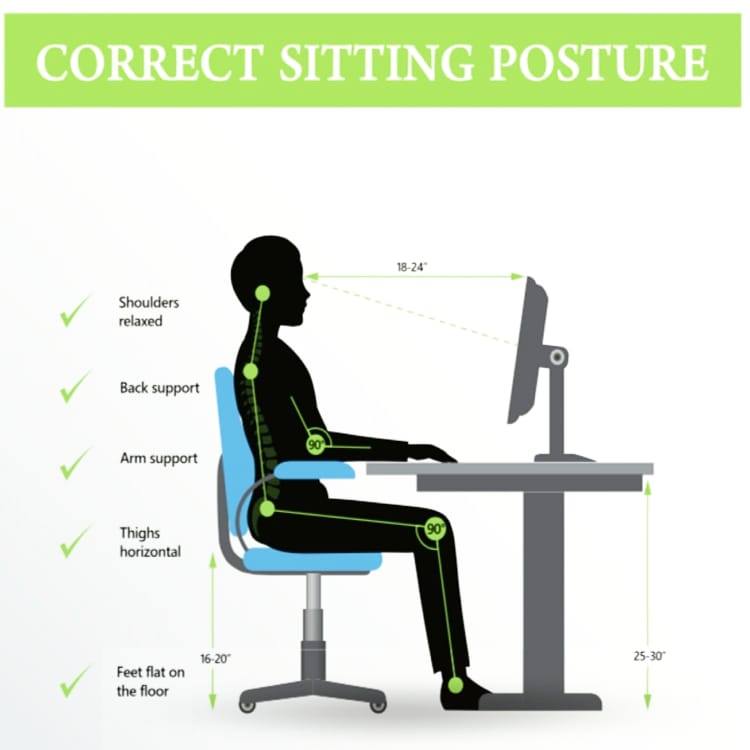
As a general guide:
- Your feet should rest flat on the floor
- Your knees and elbows sit around 90 degrees
- Your screen comes up closer to eye level
- Your shoulders stay relaxed, not lifted
If you’re working from a laptop, this is where things get tricky. It’s difficult to keep both your neck and arms in a comfortable position at the same time. That’s why even a simple external keyboard, paired with raising your laptop on books or a stand, can make your setup feel completely different.
Get Up! Movement Is Just as Important as Your Setup
Even the best workstation won’t fully offset long periods of sitting.
Taking regular breaks—whether that’s standing up, stretching, walking around, or just resetting your posture—helps keep your body from settling into tension. It doesn’t have to be complicated. A quick reset every 30–60 minutes is often enough to make a difference.
When Posture Starts to Catch Up With You
Sometimes, improving your setup helps—but the discomfort sticks around.
If you’re noticing ongoing tightness, headaches, or pain that builds through the day, it may be worth looking a little deeper. Posture is rarely just about how you sit; it’s also about how your body moves and adapts over time.
In these cases, chiropractic care in Ottawa can help assess what’s contributing to the strain and how to support better movement patterns. You can also explore more detailed guidance in our page on desk posture and work-related strain.
Small Changes, Real Impact
Your work-from-home setup doesn’t need to be perfect—it just needs to support you a little better than it did yesterday.
Adjusting your screen height, changing how you sit, and building in small movement breaks can reduce strain more than most people expect. And if your body is already feeling the effects, a more personalized approach can help you get back to feeling comfortable again.
Book with our chiropractors for posture and back care in Ottawa:
🔗 Book Your Appointment Online
📞 613-695-1213
📧 admin@triadahealthottawa.com
📍 Learn more about our team and location on our Our Clinic page.